

Email signature manager integrated with Google Workspace

Simplify email signature management for Google Workspace

Managing professional email signatures for an entire team can be challenging and time-consuming.

Quickly update signatures for all users from one centralized platform, eliminating the need for complicated instructions or manual updates on individual devices.

Integration with Google Workspace

Why choose Bybrand for Google Workspace?

Bybrand integrates seamlessly with Google Workspace, allowing you to easily create, deploy, and manage consistent and professional email signatures from a centralized, intuitive platform.

Play button See the full feature presentation.

Synchronize effortlessly

Employee turnover and team restructuring no longer require manual signature updates.

Bybrand connects effortlessly with your Google Workspace user directory, allowing easy synchronization and bulk updates to keep signatures accurate and consistent.

Filled Update the email signature from any user in Gmail with only one click
Filled Save time without visiting each machine individually

Filled Eliminate complicated tutorials for users

Don't wait any longer. Deploy email signatures effortlessly

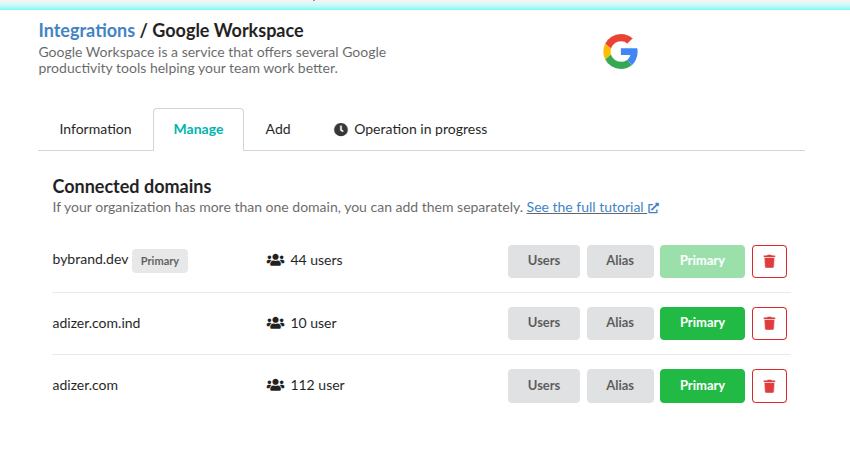
Google Workspace alias and multi-domain

Accommodate alias addresses and multi-domains

Bybrand provides continuous support for businesses using multiple domains and email aliases.

Easily manage domains and instantly update signatures for both primary and secondary email addresses, maintaining brand consistency and clear communication.

Filled Support for you to add all domains in your organization

Filled Update the signature on users' secondary email addresses

Transform the signature management

Standardizing email signatures doesn't have to be complicated. Bybrand's automation feature uses dynamic placeholders to populate signatures automatically with employee details, significantly reducing the time and effort required for maintenance.

Here are some of the main features of Bybrand's platform:

Filled Bulk-update signatures for selected user groups

Filled Create email signatures using a profile photo from Google Directory

Filled Import users directly from Google Workspace Groups

Filled Synchronize user information

Boost marketing, sales, and branding

Professional email signatures do more than provide contact information. They increase brand visibility, streamline sales processes, and reinforce marketing initiatives.

Every email becomes an opportunity to increase your company's credibility and brand recognition.

Filled Reinforce your brand with consistent signatures

Filled Easily include promotional banners or relevant links

Filled Drive sales by embedding direct booking links

Email signature marketing

Ready to use Bybrand?

Bybrand on Google Workspace Marketplace

About Google Workspace

Google Workspace is a comprehensive suite of business productivity tools designed to enhance communication, collaboration, and content creation.

Bybrand's native integration with Google Workspace simplifies the implementation and management of professional email signatures, significantly increasing productivity and ensuring consistent communication across your organization.

Get it from the Google Workspace Marketplace

FAQ

FAQs email signature for Google Workspace

Straight answers about Bybrand’s integration with Google Workspace

How does Bybrand integrate with Google Workspace?

Bybrand has a native integration with Google Workspace to automate the task of implementing and managing email signatures for Gmail users. There's no need to change the domain's DNS or redirect your company's emails to our servers.


See details at: Tutorial - email signatures for Google Workspace. Arrow link

What is a signature manager for Google Workspace?

Basically, the email signature manager is a platform that makes it easier to create and manage professional email signatures for Google Workspace users.

The tool offers features such as automatic generation of email signatures and bulk sending to users’ Gmail. This saves you time by standardizing your organization’s email communication.

Can I create email signatures with users' profile photo?

Yes! With Bybrand, you can add users' face photos to email signatures using images imported directly from Google Directory. This is an easy process to carry out, making email signatures more personal and efficient.


See details at: Signatures with profile photo from Google Directory.. Arrow link

How are Gmail signatures updated?

You can update/deploy any Gmail user’s email signature in just a few clicks, without having to go from computer to computer or send complicated tutorials to employees.

There are two ways to do this: 1) Individual update, which is ideal for a few users. 2) Bulk action, which is perfect for updating the signature for a large group of users.

Does Bybrand use server-side or a native API in the integration?

Bybrand uses a native integration with the official Google Workspace APIs to import users, sync information, and update signatures directly in Gmail accounts.

The integration does not work server-side. This means the company’s emails are not routed through Bybrand’s servers, there’s no need to change the domain’s DNS, and the signature is applied directly in each user’s Gmail.