

 See the full feature presentation.
 Import users from Microsoft Entra ID into Automation groups
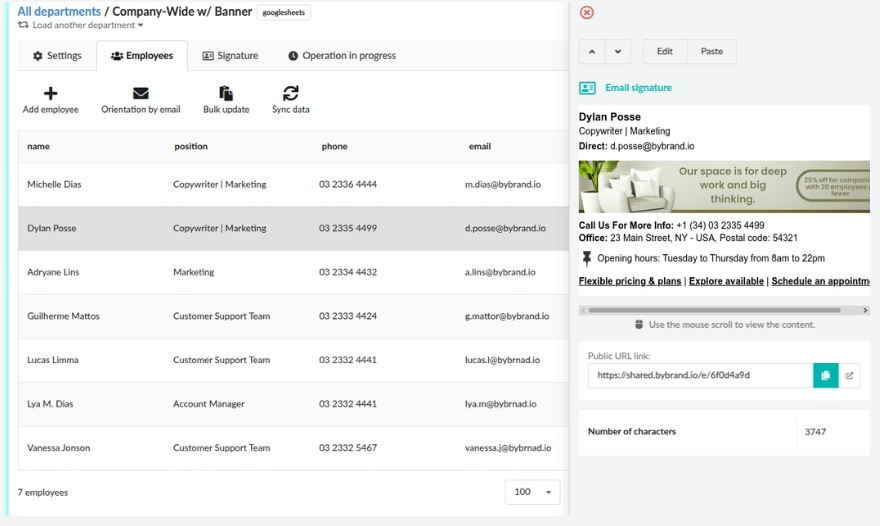




How does the integration with Entra ID work?
The integration reads information such as name, email, job title, phone number, and other attributes available in Microsoft Entra ID to generate dynamic signatures for each employee. These signatures can then be made available in Outlook with the Bybrand Add-in for Microsoft 365.
See details at: How to enable the integration.
Does the integration replace the Outlook Add-in?
No. The integration with Microsoft Entra ID imports users and generates signatures. The Outlook Add-in is used to make the official signature available within Outlook.
See details at: How the Outlook add-in works.
Who is this integration for?
Bybrand’s integration with Microsoft Entra ID was created for companies that use Microsoft 365 and need to manage email signatures with more control, ensuring standardization, convenience, and centralized information management.
It is especially recommended for IT administrators, Microsoft 365 administrators, companies that want to keep email communication consistent, and teams that use Outlook as their primary email client.
How does email signature management work in Microsoft 365?
The administrator defines which signature template will be used by each group of employees. This helps keep email signature policies in M365 clearer, especially in companies with different teams, such as sales, support, finance, and marketing.
Each group can use a signature template suited to its context, maintaining the brand’s visual standard and avoiding misaligned communications.
Can I create different signatures for each team?
Yes. You can create Automation groups and assign different signature templates for areas such as sales, support, finance, or legal. In addition, you can import users from Microsoft Entra ID groups.
Is Microsoft Entra ID the same as Azure AD?
Yes. Microsoft Entra ID is the new name for Azure Active Directory. Bybrand’s integration uses Microsoft Entra ID to import users from Microsoft 365 and generate email signatures with that data.
Does Bybrand use server-side or a native API in the integration?
Bybrand uses Microsoft’s official APIs to connect to Microsoft Entra ID, import users, and sync their data. To make signatures available in Outlook, Bybrand uses an Outlook Add-in installed in the organization.
Therefore, the integration does not work server-side: emails are not redirected through Bybrand’s servers, and there is no need to change the company’s email flow.