
This post is also available in:
Managing company email signatures shouldn’t stop when employees leave their desks.
The Bybrand Outlook Add-in now supports Outlook on mobile devices, including iPhone, iPad, and Android.
This means employees can access and insert their company-approved email signatures directly while composing emails in Outlook Mobile. With the same centralized management provided by Bybrand.
Preview:
Your email signature, wherever you work
Many professionals now handle a significant part of their email communication from mobile devices.
Until now, keeping email signatures consistent across desktop and mobile could create extra work for employees and IT teams.
With the latest version of the Bybrand Outlook Add-in, users can work from Outlook on:
- iPhone
- iPad
- Android phones and tablets
- Outlook on the web
- Outlook desktop
The goal is simple: make the approved company signature available wherever employees send email.
How it works
The Outlook Add-in connects the employee’s Outlook experience with the signatures managed centrally in Bybrand.
When composing an email on a compatible mobile device, the email signature automatically loads in the message footer.
Outlook add-in preview on Android:
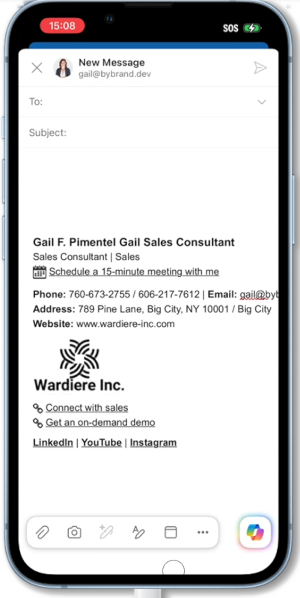
There is no need to manually copy HTML, recreate a mobile version of the signature, or ask employees to configure their signatures individually.
Administrators continue managing signatures from Bybrand, while employees simply use them inside Outlook.
Better consistency for distributed teams
Mobile support is particularly useful for companies with employees who frequently work away from their desks, including:
- Sales teams
- Executives
- Customer success teams
- Field employees
- Remote teams
- Consultants and service professionals
A salesperson replying to a prospect from an iPhone, for example, can use the same professional company signature they would use from Outlook on their computer.
This helps organizations maintain consistent branding across more of their everyday email communication.
Built for Microsoft 365 environments
The Outlook Add-in is part of Bybrand’s growing support for Microsoft 365.
Organizations can combine it with the Microsoft Entra ID integration to import employees, organize signature management, and make company signatures available directly inside Outlook.
For IT administrators, this creates a more centralized workflow:
Microsoft Entra ID → Bybrand → Outlook
Employee information can be managed centrally instead of relying on manual signature configuration for every user and device.
Already using the Bybrand Outlook Add-in?
Customers using an older version of the add-in should update to the latest version to receive the new mobile compatibility improvements.
Once updated, supported users can access Bybrand from Outlook on Android, iPhone, and iPad, in addition to the existing desktop and web experience.

Manage email signatures with more control
Bybrand helps companies generate, administer, and distribute email signatures for employees in one place.