
This post is also available in:
Key takeaways
- An email signature manager enhances professionalism and standardizes signatures across a company.
- It automates processes, allows centralized control, and adds marketing features to email communications.
- Firms with over ten employees benefit significantly from a professional email signature manager for consistency and efficiency.
- Bybrand offers comprehensive solutions for managing email signatures with integrations for both Google Workspace and Microsoft 365.
- Investing in an email signature manager strengthens brand image and boosts marketing efforts.
The use of an email signature manager has become indispensable for companies that want to convey professionalism, strengthen their visual identity, and improve corporate communication.
Today, an email signature manager is not only used to add information to the footer of messages, but also to automate processes, standardize teams, and boost digital marketing campaigns.
Even with the rise of social media and messaging apps, email remains one of the most widely used tools in the corporate environment.
And that is precisely why smart companies are increasingly investing in professional email signatures.
Table of contents
What is an email signature manager?
An email signature manager is a platform that allows you to create, organize, standardize, and implement professional signatures for all employees in a company. Instead of each employee manually creating their own signature, the software centralizes everything in a single administrative dashboard.
This ensures that all sent messages maintain the same visual style, brand identity, and accurate information.
Additionally, the tool allows you to insert promotional banners, strategic links, social media icons, and calls to action directly in the email footer.
Why is the email signature still important?
In practice, your signature is the one place every email turns into a clear, clickable “contact card.”
It conveys credibility, facilitates contact, and reinforces the company’s image in every interaction. When a customer receives dozens of emails daily, a visually organized signature can make all the difference in brand perception.
Companies that use professional signatures can increase brand recognition and improve public trust.

In addition, a well-structured signature can also drive traffic to the website, generate business leads, and increase engagement on social media.
When should you use a free email signature manager?
For freelancers, students, and small teams, free solutions can work perfectly well at the start. When there are few users to manage, the manual process is still relatively simple.
Tools like HubSpot and HoneyBook offer basic features that help create simple, functional signatures.
However, as the company grows, issues with standardization, visual inconsistency, and loss of control over the information used by employees begin to arise.
That’s when professional solutions become essential.
When is it worth investing in professional software?
Companies with more than ten employees generally see immediate benefits when implementing a professional management tool. The time saved by the IT and marketing teams quickly pays for the investment.
In addition, companies that send a large volume of emails need to ensure consistency across all messages sent.
Imagine hundreds of employees using different signatures, varied fonts, broken links, or outdated information.
The negative impact on the company’s image can be enormous.
Key benefits of an email signature manager
Brand standardization
One of the biggest benefits of an email signature manager is maintaining a consistent visual identity across the entire organization. This strengthens brand perception and increases customer trust.
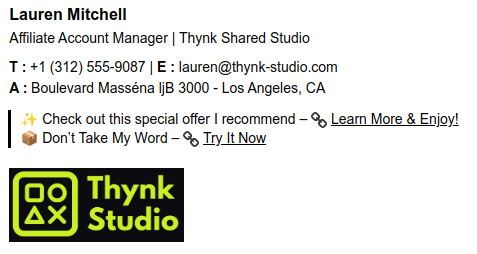
Standardization also prevents common errors, such as incorrect phone numbers, outdated job titles, or missing important information. Small details make a big impression.
Automation and time savings
Updating signatures manually can take hours of the IT team’s time. With professional software, all changes are made centrally and automatically applied to all users.
This reduces rework and eliminates repetitive tasks.
Meanwhile, your team can focus on truly strategic activities.
Integrated marketing in emails
Modern email signatures are no longer just informational.
Today, they function as highly effective marketing spaces. You can add promotional banners, seasonal campaigns, links to landing pages, and social media buttons directly to the footer.

Every email sent becomes a business opportunity.
- Solution: email signature marketing for businesses.
Customization by department
Not all departments have the same goals.
The sales team may need to highlight phone numbers and meeting scheduling, while technical support may prioritize support links and the knowledge base.
A good email manager allows you to create specific templates without losing the company’s core identity.
Example: Signature template for the support team.
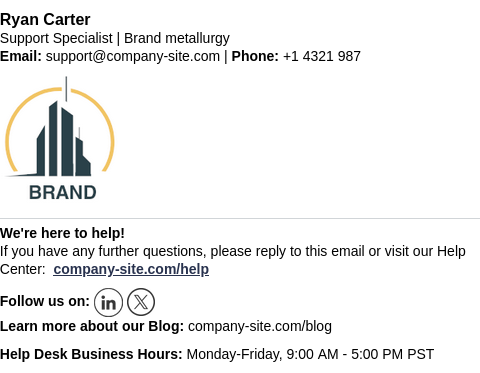
This maintains flexibility without compromising consistency.
Simple and secure implementation
Another major advantage is the ease of implementation.
Modern platforms automatically generate ready-to-use HTML signatures without requiring advanced technical knowledge from employees.
This reduces errors and simplifies the process for the entire team.
Especially in companies with many employees.
How to choose the best email signature manager?
Before choosing a solution, it’s important to evaluate some key criteria:
- Ease of management (Just set it up once and then leave it alone.)
- Compatibility with Google Workspace and Microsoft 365
- CRM integration
- Campaign automation
- Customizable templates
- Centralized control
- Information security
Also, consider the tool’s scalability. A solution that’s effective today needs to keep pace with the company’s growth tomorrow.
Bybrand: A comprehensive solution for businesses
Bybrand is a platform specialized in the automation and management of corporate signatures. The solution offers native integration with Google Workspace, Zoho CRM, and Microsoft 365, facilitating the standardization of business communication.
The platform’s main goal is to save time for IT and marketing teams by automating tasks that would normally require constant manual maintenance.
In addition, the system helps companies maintain visual consistency across all emails sent by employees.
Integrations with Google Workspace and Microsoft Entra ID
Bybrand offers specific integrations for corporate environments, ensuring centralized deployment and management of email signatures at scale.
In Google Workspace, the integration allows for standardizing signatures across the entire organization with administrative control and automation.
- Details here: Integration with Google Workspace.
In the Microsoft ecosystem, integration with Microsoft Entra ID facilitates secure connections and the provisioning/management of users and groups to apply signatures consistently.
- Details here: Integration with Microsoft Entra ID.
Demo video: Bybrand for Microsoft Entra ID:
Conclusion
Investing in an email signature manager is a strategic decision for companies that want to strengthen their brand, optimize processes, and improve corporate communication. Whether using a free solution at first or adopting a more robust professional platform, the key is to ensure consistency, professionalism, and efficiency in all email communications.
In the long term, email signature software improves the company’s image and contributes to marketing initiatives, automation, and business growth.

Create your first email signature with Bybrand
Bybrand offers the ability to generate, administer, and distribute essential email signatures for your employees.