This post is also available in:
A good set of email signature templates helps standardize team communication without requiring each employee to start from scratch.
With this in mind, Bybrand has gained ten new HTML templates, ready for quick customization with photo, logo, CTAs, banners, and legal notice areas—following the same level of professionalism used in templates for managing partners and other leadership positions.
Below is a summary of each item and in which situations it works best.
Model 106
3-column email signature, 600px wide.

On the left, a prominent face photo; in the center, name, job title, and contacts with phone, email, and website icons; on the right, company logo and social icons.
At the base, text links (“Portfolio” and “Schedule a meeting”) act as discreet CTAs to take the reader to strategic pages. Suitable for analysts and sales executives who need to combine visual proximity with a focus on scheduling meetings.
Model 203
2-column layout, 480px wide.

Name and position appear prominently on the left, followed by telephone, address, and website; on the right, the centralized logo reinforces the brand.
Below a dividing line, there is a long confidentiality notice block, ideal for law firms, senior management, or any company that requires standard legal text in all emails.
Model 205
Signature with 600px width and strong visual appeal to the brand.

The left-hand column is a vertical panel with a large logo and slogan on a colored background; on the right are the name, job title, address, telephone number, and website.
The template includes a LinkedIn icon next to the name and a small “Follow on” CTA focused on social networks. Perfect for fashion brands, creative studios, or businesses that want to highlight their visual identity before their contact details.
Model 303
Compact model, around 320px wide, designed for mobile.

At the top, the profile photo and logo are side by side, followed by the name, job title, direct e-mail address, telephone number, and address in a single column.
Just below, a colored banner with two CTA links (“View Current Listings” / “Schedule a Private Viewing”) guides the reader to clear actions. It’s an excellent option for realtors or professionals who work with schedules and catalogs of offers.
Model 304
1-column email signature, 320px wide.

The logo is at the top, followed by the name, job title, and a clear line describing the company. Highlighted is a full-width button with the text “Schedule a 15-minute meeting with me”, acting as the main CTA.
This is followed by telephone, e-mail, address, website, and, at the end, social network icons in circles. Suitable for consultants, coaches, and service providers who make a living out of quick meetings with prospects.
Model 1019
2-column layout about 480px wide.

With name, position, email, and address. A block with the logo and social media icons aligned horizontally. Below, a continuous text area for a liability or compliance notice, occupying the entire width.
It’s the ideal template for accounting, auditing, or regulated companies that need a legal footer on every submission.
Model 2026
1-column signature, width around 480px, focused on marketing,

The company logo and slogan appear in the header, followed by the name, job title, and “Schedule a consultation” link.
In the next line, telephone and e-mail are presented in a straightforward manner. The big star is the horizontal banner in the footer, promoting a free guide with a “Download now” CTA—perfect for capturing leads from the daily email.
Model 2027
Template designed for customer support teams, with a width of 480px.
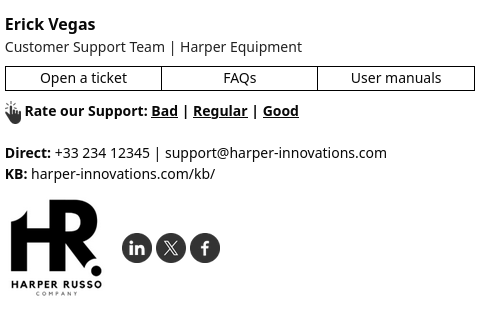
Right from the start, the name of the attendant and the support team appear clearly.
Next, there is a bar with three horizontal buttons: “Open a ticket”, “FAQs” and “User manuals”. Below that are links to service ratings (“Bad | Regular | Good”). At the bottom, direct contact, a link to the knowledge base and a logo with social icons.
Perfect for service desks, SaaS software, and call centers that want to reduce the number of manual responses.
Model 2029
Signature with 1 main column, 480px wide and ideal for sales teams.

At the top, name, job title, phone number, cell phone, and e-mail address. Followed by text links to the month’s offers and the official website. Social media icons appear just below, ensuring quick access to the brand’s platforms.
The footer features an eye-catching graphic banner for an event (such as a “Wine Night”), with the date, time, and visual CTA. Ideal for sales teams promoting events, tastings or recurring launches.
Model 2040
Template aimed at financial or health services companies, with 1 column and a width close to 480px.

The top combines a logo, promotional seal, and circular images, reinforcing the benefits of the service. Below, the main contacts (telephone, cell phone, address) and opening hours appear clearly, along with links to social networks.
The footer is dedicated to a compliance notice, including mention of HIPAA and guidance for the recipient.
Excellent for call centers, clinics, and companies that handle sensitive data and need to communicate seriousness and information protection.
Model 3018
1-column email signature, around 480px wide, designed for support teams.
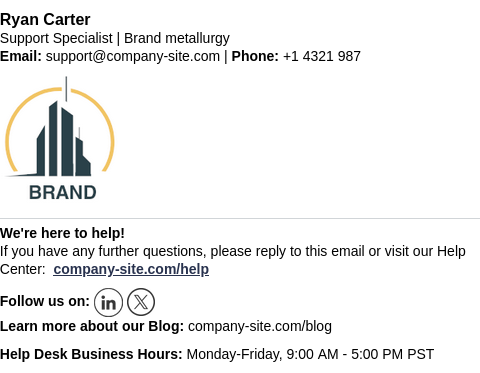
At the top, the attendant’s name, job title, e-mail address, and telephone number appear. Just below, the company logo occupies a centralized area, creating a visual break before the service information.
It’s an ideal model for companies that want to reduce friction in customer service. This way, the official support channels, educational content, and the team’s opening hours are always at hand.
How to start creating your signature with these templates
Using one of the new templates is quick and intuitive. The process starts directly in your account. When you log into Bybrand, click on the option to create a new signature and choose the alternative to create one from an existing template.
Then, click on the New option.
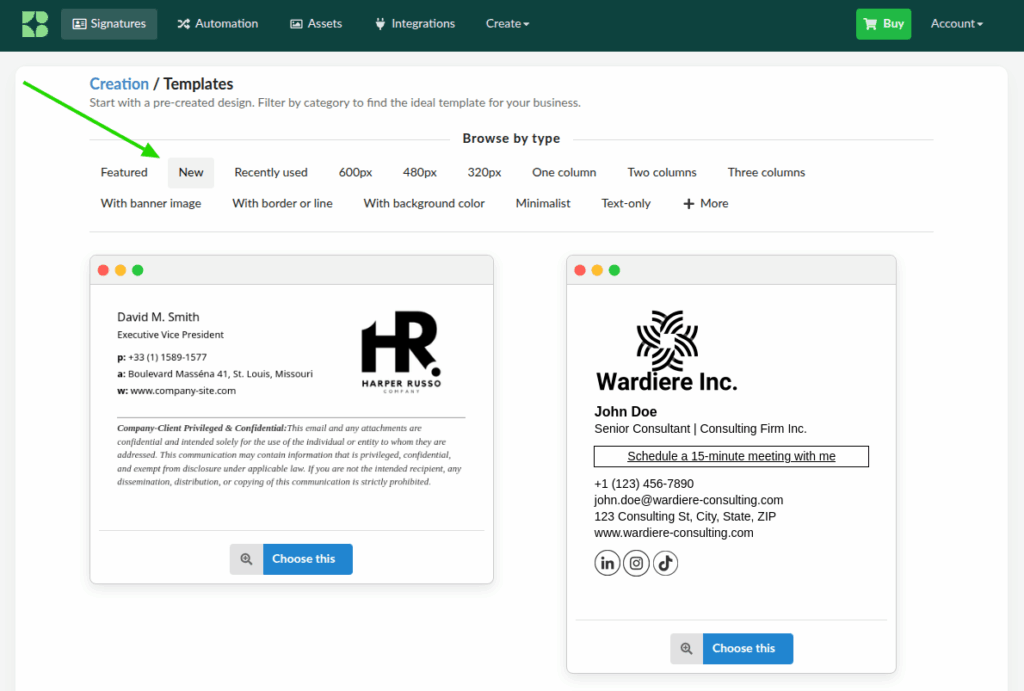
After choosing a template, you will be directed to the editor, where you can change your photo, logo, name, job title, phone numbers, emails, CTA links, banners, and legal text. All changes appear in real time.
Conclusion
Bybrand’s new email signature templates cover everything from sales and consulting scenarios to support, events, finance, and highly regulated sectors. In common, they all have structures designed for conversion (CTAs, banners, calendar links) and for the real day-to-day work of teams.
Within your account, you can adapt these templates in a few minutes, changing photos, logos, colors, and texts.
Thus, each e-mail carries not only contact information but also concrete opportunities to build relationships and generate business.

Create your first email signature with Bybrand
Bybrand offers the ability to generate, administer, and distribute essential email signatures for your employees.