
This post is also available in:
The email signature editor has a feature to edit and manage cells’ borders, which can be very useful for logical elements such as pictures and texts or a better, prettier design. The border feature can also be used to create a vertical line.
Video tutorial
Watch the full video tutorial on how to do it.
Adding borders into your email signature
For the option to appear, you need to select a cell, this usually appears in all signature fields. You can see an example below.
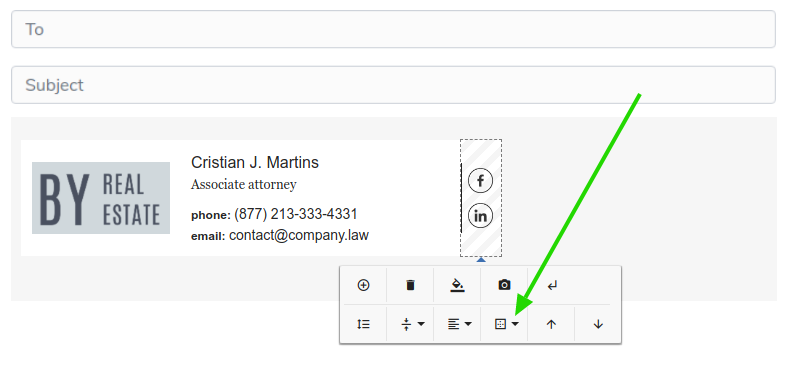
After clicking the borders option, choose the direction you’d like: all sides, only on the left, right, top, or bottom.
In the following example, we will only add it to the left side of the chosen cell. After clicking, a pop-up will appear to customize the style, size, and color.
Let’s talk about them below.
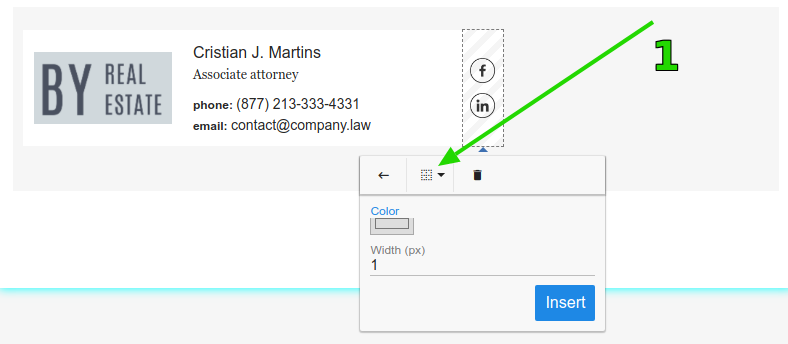
Understand the options:
- First, you need to select the style: solid, dotted, dashed, or double. Solid is the default.
- The second step is selecting the color of the border.
- The last step is setting the width of the line, which can be from 1 to 10 pixels.
After the third point, the border will appear in the signature as designed.
Removing a border
Occasionally, a border may not be needed. It’s possible to erase it and configure a new one, as well as remove it completely. Choose the direction of the border you’d like to delete (everything, left, right, top, or bottom), and then click the trash icon.
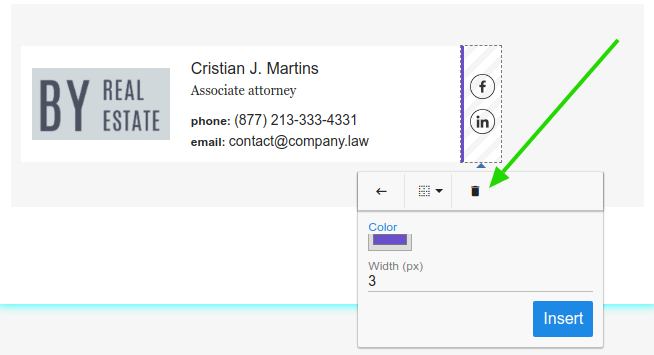
Done, the border will be removed. If this doesn’t work, maybe you selected something wrong. Try to remove it with the option to erase all sides.
Email signature templates with borders
Light Studio
Clean and balanced template, with a thin vertical border separating the logo from the contact information.

Lyon Office Park
The signature is composed of sections divided by straight, continuous borders, creating a solid and formal structure. The column layout reinforces the corporate and well-defined appearance.

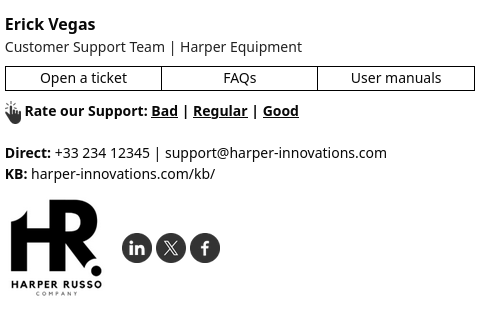
Harper Russo – Support
Modern format with discreet top borders that delimit the area for quick links. The use of lines provides order and facilitates navigation between the elements of the signature.
Related
If you need any clarification or difficulties, please get in touch with our support team via email or chat.