
This post is also available in:
This option is essential in Bybrand when the same employee belongs to two or more groups. It clearly and predictably defines which email signature will be considered the primary one at the time of automatic deployment.
In practice, each group has an associated email signature. When an employee belongs to more than one group, the system needs a criterion to decide which signature to deploy automatically.
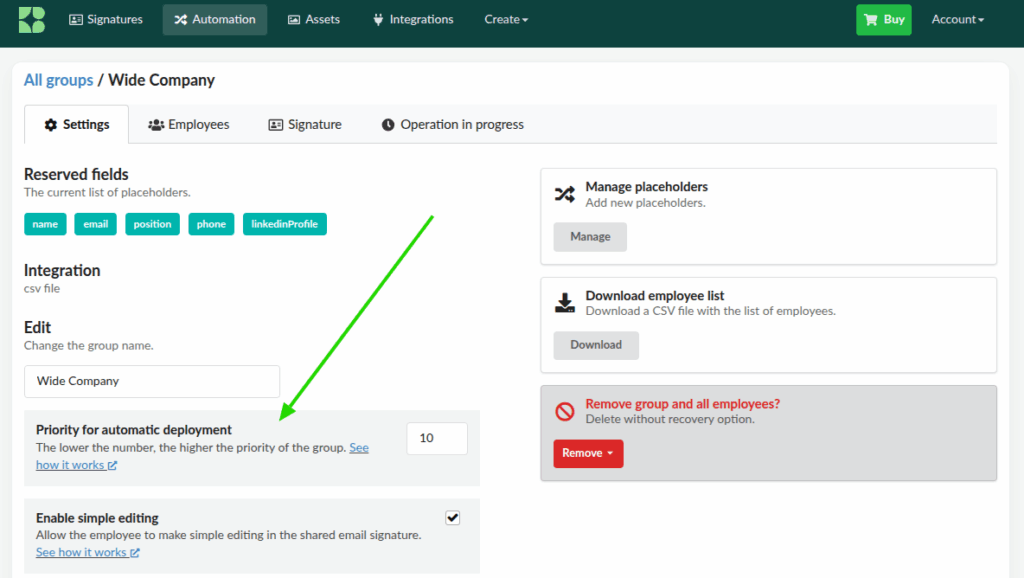
Where to configure the group priority
- Go to the Automation menu
- Open the desired group
- Go to the Settings tab
- Locate the “Priority for automatic deployment” field
- Set a number (e.g., 1, 5, 10)
- Click Save
Example:
When this priority is used
The priority is applied whenever Bybrand needs to choose a single default signature, for example:
- When using the Outlook Add-in, when the employee clicks “New message”
- In automatic deployment scenarios
In these cases, Bybrand evaluates the groups the employee belongs to and selects the group with the highest priority.
Priority tie
If two or more groups have the same priority, the oldest group (created first) will be used.